Moving from Hugo to Astro
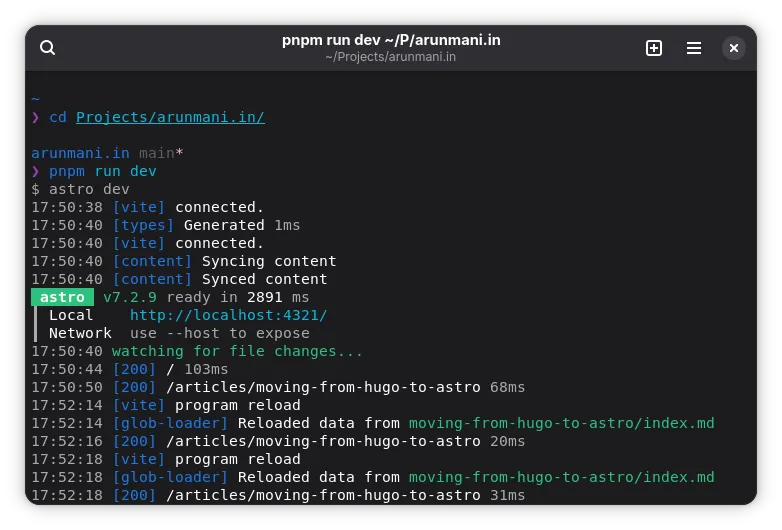
I have migrated my site from Hugo to Astro. This article is about the motivation and the process. This goes without saying, but please remember that this is not because I hate Hugo or Hugo had any critical problems. I still love Hugo. After all, it was Hugo which let me create my first real website.
Why move?
When I created my website, Hugo was the talk of town. Every Linux and open source community I was part of suggested Hugo if you wanted to make a personal blog. I, in turn, suggested Hugo to my friends whenever they asked me about creating a new site. I also created sites for my friends using Hugo and taught them how to upload new article. Everything was going well. So what happened?
Complexity
Hugo felt a little complex to me. No matter how many times I read the documentation, the next month I will get confused again. I have also heard from others how it is difficult to learn how to do something in Hugo.
May be, it is because Hugo is full fledged. It has everything you need to be your own content management system (CMS). For a simple website, such as mine, it felt overwhelming.
For example, Hugo’s template lookup order was filled with a big block of rules with jargon like section, list, kind and it was easy to get lost. I still remember, when I used Hugo for the first time, I was not able to figure out how to add tags to a page and then list them out below every article. After a few web searches, I found that Hugo calls them taxonomies.
Development environment
Hugo uses it’s own templating language based on Go (I think). So this means you need a development environment that has support for Hugo’s language, HTML, CSS and TypeScript/JavaScript.
For example, I like to format my code using Prettier. Prettier does not support Hugo natively, so we
need a Prettier plugin. I found out existence of
prettier-plugin-go-template, but was
hesitant to use it because it felt arbitrary. So I survived with editing Hugo files as HTML and then
changing to text mode
right before saving. Obviously, this is not a fault of Hugo, just a personal hiccup.
Different language
Hugo’s templating language can be written only in Hugo pages. It was a little difficult to experiment and debug them as every change required flowing through the website rendering. I think now we have better methods.
Then, because it is Hugo specific, you were missing out bigger ecosystems like NPM etc. Again, I never had a need for anything outside what Hugo provides, but I always had a doubt of what if.
Just curiosity
The above arguments may not sound that convincing. Honestly, I also feel that way that I’m writing it. But the one part that pushed me with the move is mere curiosity. I was simply excited to try something new and see how it goes.
Move where?
Okay, now with this and that, I convinced myself that I should move. The next question was, move where?
I straight out skipped any React based frameworks because I never liked JSX.
I like Vue and Nuxt, a Vue based framework. Nuxt supports converting Markdown to HTML and other things necessary for a personal blog. So it was my first preference.
However, the major problem with Nuxt was, it was difficult to get a site without JavaScript. The solution involved adjusting the routes to target all the pages the site can have. So it meant extra work.
I did not go in Svelte way as it felt unappealing to me somehow.
So, may be I was finding faults to disregard the above options for Astro. When I opened Astro’s website astro.build, I saw the following as the first feature.
Server-First
Astro improves website performance by rendering components on the server, sending lightweight HTML to the browser with ZERO UNNECESSARY JAVASCRIPT OVERHEAD. (Emphases mine.)
That’s it. Sold.
Really Astro?
Yay, it is settled then, Astro is the key. To convince myself that the move is worth, for the sake of formality, I compared the problems I faced in Hugo with options Astro provides.
Simplicity
Astro’s documentation was simple. No different jargon, no complex rendering rules. Astro has three things: components, pages and content. That’s it. A layout is a special component. You can understand full feature set of Astro in just an hour.
Common web environment
Astro was built on top of the standard web environment. So it worked with NPM, PNPM etc. and used
TypeScript as the programming language. Its files are written in .astro and used JSX syntax. But
underneath, it was just TypeScript.
Astro has an official plugin for Prettier, it comes with an LSP server. I used the community instructions to set it up for Emacs and it worked out pretty good.
It is TypeScript
The code you write in Astro is TypeScript. So I was able to organize my code into files and import, export among them based on my choice. Astro had super relaxed project structure. They mandate only a few files (that too configurable) and leave the remaining to your personal preference.
And I can now use any package from NPM etc. without issues.
Writing in TypeScript also means my code is typed, the front matter in my Markdown is typed. I love typed code and Astro offered strict type safety configuration.
Rewriting is not bad
It is my personal site, I can rewrite it as I like. So I thought I could use this opportunity to reshuffle the site into super fresh layout. But ultimately, I ended up at the same old structure…
The Astro-logy
Now it is time to move to Astro. Since I decided to rewrite the site from scratch, I did not check any migration details. I created a fresh project, installed Tailwind CSS, DaisyUI and started editing.
To migrate my articles, I wrote a custom Python script that rewrites the front matter and then
verified the diff.
Astro, like Hugo, has out of box RSS support, so that went smooth.
Branching out to Astro was not full of sunshine and rainbows. I had a few places of confusion too.
Image
Almost all the web frameworks and generators, including Hugo, support a way to optimize and bundle
images used in the site. I did not prefer them and manually did the process and included the images
as static assets. For example, I would convert the images to WebP and then
edit them for cover images.
With trying out something new, I decided to check what all the builtin image processing is for and use it. Astro has a dedicated guide on how to use images. I found it a little confusing because you have to refer the images in such a way that Astro knows them.
Then, I wanted to avoid manually making cover images and use CSS. This needed fighting a few battles with CSS to finally reach the solution. May be I should post the card making process in CSS as a separate article as I frequently face it.
Figure
Hugo has a way to present an image with description into a
figure with caption.
It uses figure shortcode for it.
Astro does not support it. The proper way to do that would be to move to Markdown superset - MDX. But I did not like to move from Markdown.
Thankfully, Astro supports concepts of
plugins, which
you can plug into the Markdown to HTML process. I
requested adding this as a builtin feature
in Astro, but they suggested to use existing plugins. For clarification, all Astro plugins to modify
Markdown and HTML follow the API of syntax-tree. So there is no
need for Astro-exclusive solutions. Just find a plugin from the wider community and then use it.
This is exactly the power of ecosystem I talked about.
But however, I was hesitant to add a new dependency. The code to find out if a paragraph contains
only an image and swap it with a figure was trivial. So I
implemented my own.
It used the rehype-figure plugin’s code as
inspiration.
Archetype
Hugo has a feature called archetypes. Basically they are templates which will be used to create new content. So if you type the following, you would get the Markdown for it ready, filled with date, title etc. based on your template.
$ hugo new content articles/something.mdAstro, on its own, does not have something similar. Making one is super easy anyway. Just add a new
script that copies your template and does some
string replacement. However I have not implemented it as I’m okay with manually doing it. It is just
copying a folder after all.
Org
I have an article that
has Org Mode code snippets. Astro allows us to use Shiki and Prism for
syntax highlighting. Both of them did not
support Org. But adding support for Org was easy thanks to
vscode-org-mode having
the grammar ready and both Shiki and Prism allowing custom languages.
So I made a pull request to Shiki and temporarily had the grammar along my code, till Shiki made a new release.
JSX
Astro’s template expressions are JSX-like. As I’m not a fan of JSX, I had to motivate myself to use it somehow.
Bonus
I used this chance to revamp my resume. Previously, I wrote my resume in Org (and LaTeX) and compiled it manually using Emacs and uploaded the PDF to GitLab. This time, I decided to go with Typst. I used Astro’s endpoints feature to render it as PDF when the site is built.
I also replaced the old icons with Phosphor Icons.
Conclusion
Overall, I was able to migrate my site to Astro. One thing to agree is, Hugo got everything. You rarely needed to step outside for any feature. On the other hand, Astro gave you a clean core and power to do things in your own way as you prefer. I like both the approaches. With the plus being, on Astro you make the things you want in the way you want.
That is it. The journey of migrating my site from Hugo to Astro. I would like to reemphasize that under no circumstances I’m blaming Hugo or Astro or any of the package/community I mentioned here for my problems. They all have their own plus and minus. Even while writing the article, I still wonder how I was able to convince myself to make the move. May be, it was curiosity all along.
What do you think? Feel free to share your thoughts.